


EZChildTrack Parent Portal
3.010.00 Reviews
App Specs
- Version
- 2026.0.0623
- Updated On
- License
- Free
- Downloads
- 10,000+
- Developer
- EZChildTrack
- Categories
- Parenting
- Platform
- Android
Screenshots
 Analysis by AppCompare
Most childcare days begin with a small chain of details: a change to pickup, a payment to check, a note from the center, and the question of whether I have the right information at hand. That is the kind of routine the EZChildTrack Parent Portal is meant to support. It is a free parenting app from EZChildTrack, and its focus is the practical connection between families and childcare providers rather than general family planning. I would consider it when a child’s center uses EZChildTrack and I want a single place to follow the parts of that relationship the portal makes available.
Starting with the center’s routine
The key decision is whether this portal fits the way your childcare provider already works. A parent app cannot replace a center’s own processes; it is useful when the staff and family are using the same system to keep track of relevant information. If your provider relies on EZChildTrack, the portal can give you a familiar route to check the records, messages, documents, or billing information described in the app’s available functions. If your center uses another system, or communicates mainly by paper and email, installing this one may not simplify anything.
That distinction matters because childcare logistics are shared work. A parent may need to know what has changed, while staff need families to receive and act on information consistently. I see the portal as a place to manage that handoff, not as a substitute for talking with a teacher when something is urgent or unclear. For everyday coordination, having one place to look can reduce the chance that a message gets buried among unrelated emails.
Following a normal day from check-in to pickup
Picture a weekday when work runs late and another adult may need to handle pickup. I would begin by checking the portal for any center messages or announcements, then look at the information relevant to the child’s day. If there is a document or billing item to take care of, I can deal with it while I still have a moment instead of discovering it during the evening rush. The useful outcome is not that the app makes the day effortless; it is that it can make the next action easier to identify.
A good habit is to check the portal at a predictable point in the day rather than opening it every few minutes. For example, I might review new information while planning the next morning, then return only if a notification points me to something that needs attention. This keeps an app meant to reduce mental clutter from becoming another stream I feel obliged to monitor constantly. For time-sensitive pickup changes, I would still use the communication route the center says it monitors, rather than assuming an in-app message will be seen immediately.
That is one of the portal’s less obvious trade-offs: a shared system is most helpful when both sides use it in a consistent way. Parents can make their own routine more reliable, but they cannot control how quickly staff respond or whether every update appears in the same place. I would confirm with the provider which items belong in the portal and which should be handled by a phone call or another direct method. That small conversation can prevent an important request from sitting in the wrong inbox.
What changes when several adults share care
For a household where two parents, a grandparent, or another trusted adult helps with childcare, the portal can be part of a handoff routine. One person can check the information before drop-off and pass along the relevant detail to the person doing pickup. That works best when everyone knows who is responsible for checking updates and when a change needs a direct conversation rather than a quick assumption. I would avoid relying on a single person’s memory when a schedule change affects more than one caregiver.
Worth Reading Before You Choose

EA SPORTS FC Mobile 26 Is a Bigger Football Game, but It Takes Time

Flipboard Shows What News Apps Must Do Beyond the Feed

Switching to Android Auto Means Rethinking Your Driving Routine

Google Calendar Makes a Crowded Week Easier to Manage

Ludo King Makes the Most of the Minutes Between Plans

Baby Panda World Brings Quick Play to Modern Phones, but Its Game Library Feels Busy
Before using any shared account or device arrangement, I would check with the center how it expects family access to be handled. A child’s information is personal, so convenience should not mean casually passing around login details or leaving a signed-in phone where others can open it. The app’s parenting role makes privacy part of the practical setup, even when the immediate task is simply checking a message or finding a document.
Where it sits among childcare options
Compared with a general calendar, email, and a folder of scanned forms, a provider-linked portal can keep childcare-related tasks closer together. A calendar is more flexible for family plans, and email may be better when a parent needs a searchable record across many organizations. A paper folder can work perfectly well for a small number of documents, especially for families who prefer not to manage another account. The portal makes the most sense when the childcare provider’s own workflow gives it useful information to show and tasks to handle.
I would not choose it as a broad school organizer or expect it to replace every tool a family uses. Childcare management is its lane, and a family with school-age children may still need separate systems for school notices, activities, and household scheduling. The practical comparison is therefore not “one app versus everything,” but whether it saves enough back-and-forth with your childcare center to justify checking another app.
Organizing Your Child’s School Life
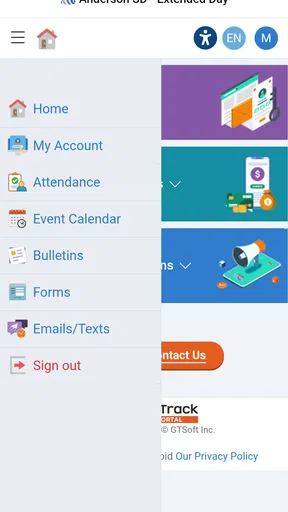
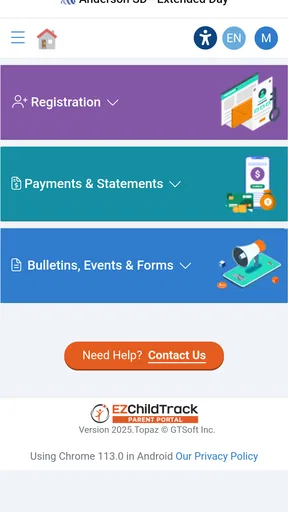
First things first, the EZChildTrack Parent Portal is all about making your life easier. When you log in, the interface is pretty straightforward, almost like it was designed by someone who understands the morning rush. Everything you need is right there at your fingertips. From attendance records to grades, it’s all just a tap away.
What I love most is the calendar feature. Imagine having all your child’s important dates in one place. No more sticky notes on the fridge or trying to remember what day the science project is due. It’s all here, neatly organized, and color-coded for good measure. You can even sync it with your personal calendar, which is a game-changer if you ask me.
Communication Made Simple
Ever missed an important announcement because you didn’t check your email in time? With this app, that’s a thing of the past. The messaging feature lets you communicate directly with teachers and school staff. It’s like having a direct line to the school, minus the hold music.
And here’s the kicker, there’s a notification system that alerts you about new messages or announcements. So, whether it’s a change in the school schedule or a reminder about a field trip, you’re always in the loop. No more surprises!
Accessing Important Documents
Gone are the days of rifling through folders to find that elusive permission slip. With the document storage feature, you can access all vital documents anytime and anywhere. Whether it's medical information, school policies, or emergency contacts, it’s all stored securely in the app.
This not only saves time but also reduces the stress of last-minute searches. Just imagine, sitting in the carpool line and realizing you forgot a form. With a few taps, you can pull it up, and you’re good to go.
Keeping Track of Finances
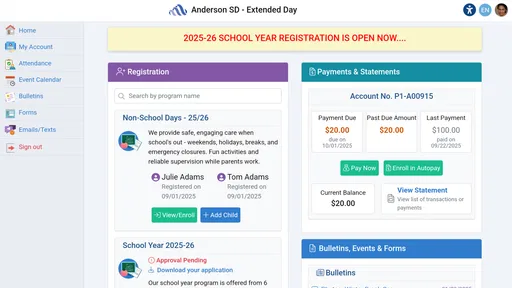
Let’s talk about the financial side of things. School expenses can be a real headache, but the app simplifies this with its billing features. You can view invoices, make payments, and even set up reminders, all within the app. It’s like having a personal accountant who specializes in school finances.
Plus, the transparency is top-notch. No more guessing where your money is going. Everything is detailed out for you, making it easier to budget for upcoming school expenses.
Why I’m Hooked
So, why am I singing praises about this app? Because it genuinely makes life easier. As a parent, being able to streamline all school-related activities into one app is a lifesaver. It’s reliable, easy to use, and keeps you connected in real-time.
Whether you’re a tech-savvy parent or someone who’s still figuring out how to send emojis, the EZChildTrack Parent Portal is intuitive and user-friendly. It’s designed to take the stress out of managing your child’s school life, giving you more time to focus on what really matters.
In a world where everything seems to be getting more complicated, this app brings a breath of fresh air. So, if you're looking to declutter your life and keep a better eye on your child’s academic journey, give it a shot. Trust me, you won’t regret it.
A sensible setup before relying on it
When I try a provider portal, I first establish which tasks it actually handles for my family. I would check whether the center expects parents to use it for attendance information, messages, documents, or bills, then make a short checklist of the items I need to review. That is more useful than assuming every childcare detail will be gathered automatically. A portal can only reduce searching when the family knows what belongs there and staff keep that channel current.
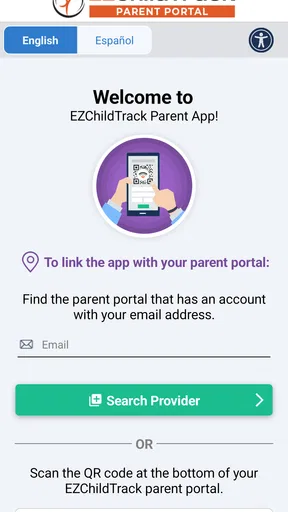
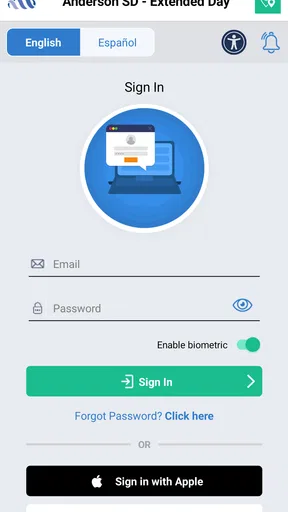
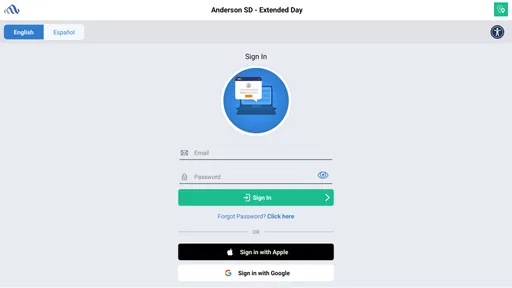
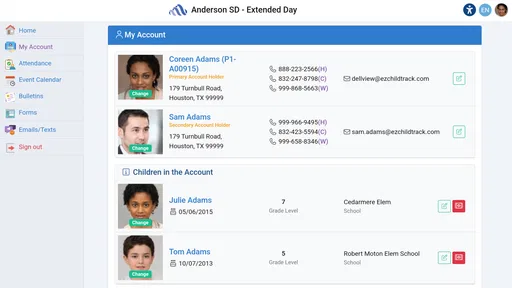
I would also make the first login a quiet task, not something to do while walking into work or standing at the classroom door. Take a moment to identify where the center’s updates appear and how the account presents any outstanding action. If the layout is clear, future checks can be quick; if a label or status is confusing, asking staff early is better than guessing when a deadline is close. This is a simple but valuable way to avoid turning a helpful tool into a source of uncertainty.
Who is likely to get the most from it
The strongest fit is a parent whose childcare provider actively uses EZChildTrack and who wants a more orderly way to follow center-related information. It may be especially useful when a family has recurring administrative tasks, shares pickup duties, or often needs to refer back to a document. Parents who are comfortable checking a dedicated account and using a phone for routine coordination are also more likely to appreciate it.
I would be more hesitant if your childcare arrangement is informal, changes from week to week, or already runs smoothly through a reliable channel you prefer. A family that needs one universal calendar for school, work, activities, and several providers may find a general calendar better for the overall picture. The portal can still serve its narrow purpose, but it is not a replacement for that broader planning tool.
Reading the signals and keeping expectations grounded
The app is rated 3.0 on average from around 21 ratings, with about 10 written reviews, and has over 10,000 installs. I read that as a reason to approach it with practical expectations rather than assuming a polished, universally loved experience. Those figures do not tell me what any individual family will encounter, but they make it sensible to test the parts your center relies on and decide whether they work well in your routine.
It is free, rated for Everyone, and was released on April 16, 2023. The current version is 2025.0.1009, and it supports Android 5.0 and newer. Those basics make it accessible to many Android users, though I would still check that the device in use can install and run it comfortably before making it the household’s main route for childcare updates.
When the routine works—and when it does not
My verdict is that this is best treated as a practical extension of a participating childcare provider, not as a standalone solution to every family scheduling problem. If your center uses it consistently, the value comes from having a familiar place to check and act on childcare matters. If the provider rarely updates it, or your family prefers direct conversation and a paper record, the extra app may add another step without removing much work.
I would start by using it for one ordinary week: check the relevant updates at a set time, handle a document or billing task if one comes up, and notice whether the next caregiver can find the information they need. That trial gives a clearer answer than the feature list alone. For families whose center already runs on EZChildTrack, it can help make routine handoffs more organized; for everyone else, the better choice is the tool their provider actually uses.
Pros
- User-friendly interface for easy navigation.
- Real-time updates on child's activities.
- Secure access to child's information.
- Efficient communication with educators.
- Customizable notifications for important alerts.
Cons
- Limited offline functionality.
- Occasional sync issues with data.
- Requires frequent updates for stability.
- Some features need a subscription.
- Interface can be overwhelming for new users.
FAQs for EZChildTrack Parent Portal
What is EZChildTrack Parent Portal used for?
EZChildTrack Parent Portal is designed to help parents manage their child's after-school activities and childcare services. It provides a centralized platform for scheduling, payments, and communication with the childcare provider, making it easier for parents to keep track of their child's activities and any relevant updates or changes.
How secure is my personal information on EZChildTrack Parent Portal?
The EZChildTrack Parent Portal employs robust security measures to protect your personal information. Data encryption and secure login protocols are used to ensure that your personal and payment details are safely stored and transmitted. Regular security updates and compliance with data protection regulations further enhance its security.
Can I make payments directly through the EZChildTrack Parent Portal?
Yes, the EZChildTrack Parent Portal allows parents to make secure payments directly through the app. You can set up one-time or recurring payments for childcare services, making it convenient to manage billing without needing to handle cash or checks. Payment history and receipts are also accessible for your records.
Is EZChildTrack Parent Portal accessible on multiple devices?
The EZChildTrack Parent Portal is accessible on various devices, including smartphones, tablets, and computers. The app is available for both Android and iOS, ensuring that you can manage your child's activities and communicate with the childcare provider from anywhere, at any time, as long as you have internet access.
What kind of support is available if I encounter issues with the app?
EZChildTrack offers comprehensive support for users experiencing issues with the Parent Portal. You can access a detailed help center with FAQs, guides, and troubleshooting tips. Additionally, customer support can be reached via email or phone for more personalized assistance to resolve any technical difficulties.


